To use the Proxy and Designer, you must configure them in the Post Installer. Depending on your deployment, an installation may not need to use both the Proxy and Designer. The Post Installer allows you to specify which component(s) you want to use—the Proxy, the Designer, or both. The panels that you configure in the Post Installer depend on which components you will use:
|
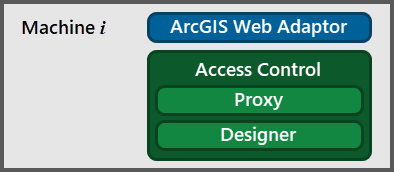
Machine with both the Proxy and Designer |
Designer and Proxy: To use both the Designer and the Proxy, configure the following panels in the Post Installer: ▪Licensing: Activate this installation of Access Control. Use the same activation key for every installation in your Access Control deployment. ▪Setup Options: Indicate that you want to use both the Designer and the Proxy. Select the Web Adaptor to proxy. ▪Portal and Sign In: Access Control requires access to your portal. Use the Portal and Sign In panel to sign in to your portal. ▪Designer Settings: Register the Designer with your portal. This allows you to use the Designer to configure permissions and filters for the Proxy. It also allows you to configure remote Proxy components to use this Designer. |
|---|---|---|
|
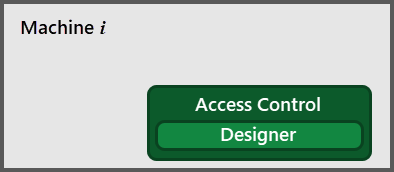
Machine with the Designer but not the Proxy |
Designer Only: To use the Designer but not the Proxy, configure these panels in the Post Installer: ▪Licensing: Activate this installation of Access Control. Use the same activation key for every installation in your Access Control deployment. ▪Setup Options: Indicate that you want to use the Designer but not the Proxy. ▪Portal and Sign In: Access Control requires access to your portal. Use the Portal and Sign In panel to sign in to your portal. ▪Designer Settings: Register the Designer with your portal. This allows you to configure remote Proxy components to use this Designer. |
|
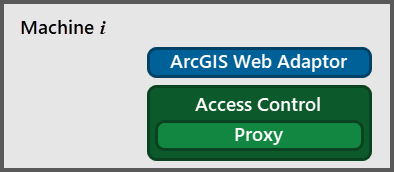
Machine with the Proxy but not the Designer |
Proxy Only: To use the Proxy but not the Designer, configure the following panels in the Post Installer: ▪Licensing: Activate this installation of Access Control. Use the same activation key for every installation in your Access Control deployment. ▪Setup Options: Indicate that you want to use the Proxy but not the Designer. ▪Portal and Sign In: Access Control requires access to your portal. Use the Portal and Sign In panel to sign in to your portal. ▪Web Adaptor Settings: Enter the URL or host name of the Designer that you want to use to configure permissions and filters for this Proxy. |