The Sidebar includes a list of options to administer, manage, and learn more about VertiGIS Studio Print Designer.
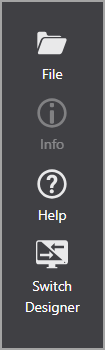
The Sidebar for SaaS Printing Designer
File
The File button displays a list of functions for managing your print layout item. The options include:
|
Description |
|---|---|
New |
Open a new print layout. |
My Print Layouts |
Displays a list of items you have saved. |
Recent |
Displays a list of recently changed items. |
Shared With Me |
Displays a list of shared items. |
Save |
Saves the current item. |
Save As |
Saves the item with a new name. |
Import |
|
Export |
|
Switch Designer |
|
Settings |
|
▪New: Open a new print layout.
▪My Print Layouts: Displays a list of items you have saved.
▪Recent: Displays a list of recently changed items.
▪Shared With Me: Displays a list of shared items.
▪Save: Saves the current item.
▪Save As: Saves the item with a new name.
▪Import: Allows you to import a .json file.
▪Export: Allows you to export to a .json file.
▪Switch Designer:
•Convert legacy print templates to ArcGIS Pro layouts.
•Switch between Designer for Legacy Templates and Designer for ArcGIS Pro Layouts.
▪Settings:
•Enter the Printing Engine URL directly into VertiGIS Studio Printing Tools. The Printing Engine must be publicly available.
•Enter the App ID to authenticate with the portal where the printing service lives.
The Settings are only configurable for on-premises Printing.
See also...
Export and Import Print Layouts
Info
The Info button displays the Title and Description of the current item. You can edit both from this panel.
The panel also provides links to:
▪The ArcGIS Online or Portal item.
▪A button to copy the item URL.
▪A hyperlink to open the item URL.
▪Information on deployment of the product.
Help
Displays the product version number and a list of links to various help topics.
