Every Access Control deployment must have at least one Proxy and at least one Designer.
The simplest deployment has both the Proxy and Designer on the same machine as the Web Adaptor. ArcGIS Server can be on the same machine as the Web Adaptor or on a different machine.
The recommended, and most common, deployment of Access Control requires ArcGIS Server to use the ArcGIS Web Adaptor. However, other deployments are also supported. For details, see Reverse Proxy Deployments.
In the following diagram, the arrow indicates that the Designer is able to configure that Proxy.
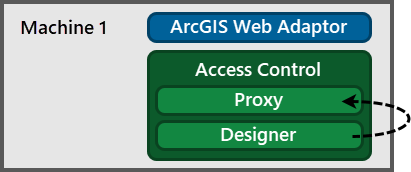
Proxy and Designer on the Web Adaptor machine (local Designer)
The Proxy must be on the Web Adaptor machine, but the Designer can be on any machine, provided the Designer has access to the Proxy.
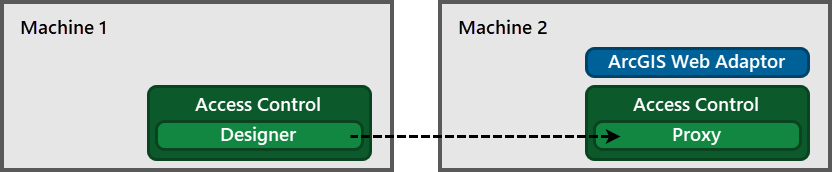
Designer on a different machine than the Proxy (remote Designer)
If you have multiple Web Adaptors on different machines, each Web Adaptor machine must have the Proxy. One way to do this is to use the local Designer for each Proxy.

Multiple Web Adaptors on different machines, each with its own Proxy and local Designer
If you have multiple Web Adaptors on the same machine, you can use one Proxy for them all.
You can use a single Designer to configure multiple Proxy components.

One Designer that serves as both a local Designer and a remote Designer
If you use other VertiGIS Studio products, such as VertiGIS Studio Workflow or VertiGIS Studio Mobile, you may want to put the Designer components for the different products on the same machine. You can then use the Designer to configure all the Proxy components.
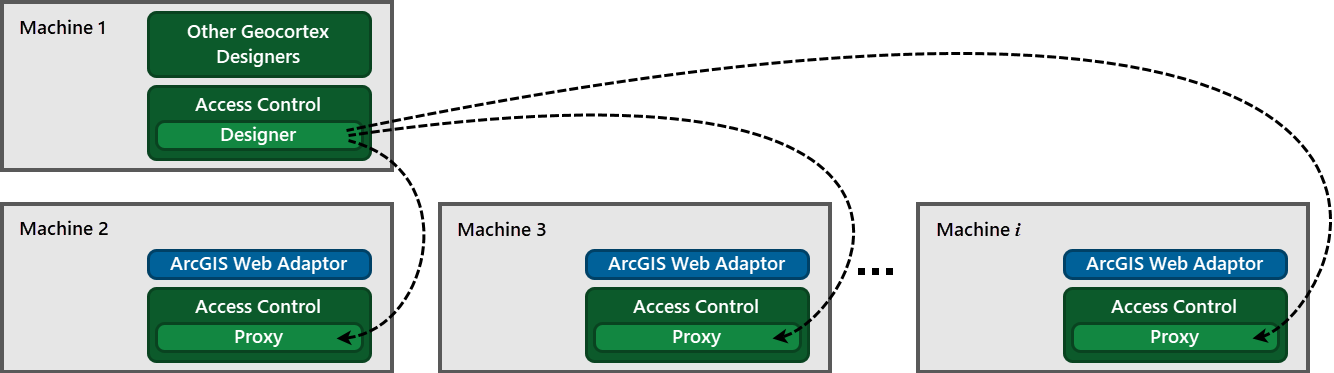
Standalone Designer on the same machine as other VertiGIS Studio designers
You can combine any of the illustrated deployment scenarios to suit your needs.
