If you want your field workers to use Pre-generated map areas with sideloaded tile packages, you must add the name of the TPK as a reference to the web map in ArcGIS Online or Portal for ArcGIS. The TPK is then sideloaded onto the device. When the device is offline, and the Pre-generated map area is activated, the Mobile app automatically uses the TPK file as its basemap. When the device is reconnected online, the default base map is used.
In Mobile apps, you can use the following:
•One ArcGIS web map per app.
•One Map Tile Package (TPK) per web map.
In summary, field workers can use a TPK with map areas created in ArcGIS Online or Portal for ArcGIS 10.9.1 when:
•A TPK file that is the same spatial reference as the basemap, has been referenced in the web map in ArcGIS Online or Portal for ArcGIS 10.9.1 or later.
•That web map is referenced in a Mobile app in VertiGIS Studio Mobile Designer.
•Map areas have been defined for the web map in the appropriate version of the Mobile app - (test), (staging), or (prod).
•The referenced TPK file is sideloaded onto the device.
•The device is offline.
•One of the map areas is activated.
High-Level Steps to Use a Pre-Defined TPK
1.In ArcGIS Online or Portal for ArcGIS, ensure that the web map used in your Mobile app is set to Enable the layers and map for offline use.
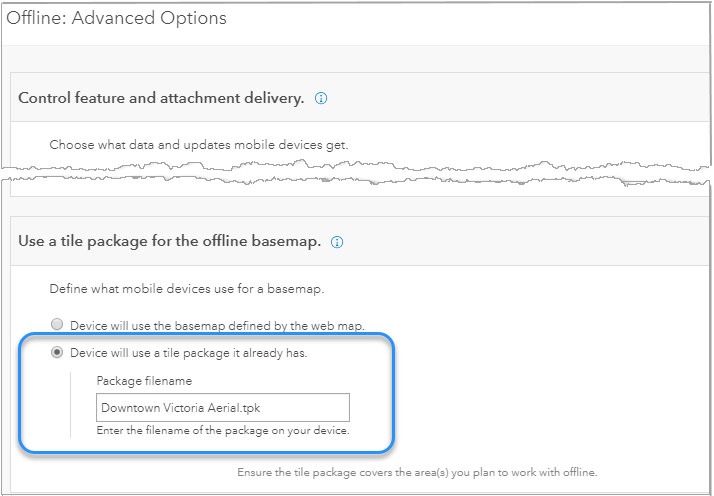
2.In either ArcGIS Online or Portal for ArcGIS, in the web map, navigate to Settings > Offline > Advanced Options > Use a tile package for the offline basemap.
3.Click Device will use a tile package it already has.
In Package filename, type in the name of the TPK file.
4.In ArcGIS Online or Portal for ArcGIS, if they do not exist, add the map areas you want to use to the web map at the appropriate stage in the Deployment stages.
Ensure that the map areas are covered by the TPK you plan to use.
5.Sideload the TPK onto the devices users plan to use, ensuring that the TPK is in the correct folder on the device so that your Mobile app can find it.
When Pre-generated map areas are used, field workers will only see the TPK when they are offline and have activated a map area. While online, they will see the normal basemap.
