Integrating VertiGIS Studio Web with VertiGIS Studio Search allows you to customize which layers use Studio Search, and which continue to use the built-in Studio Web search.
There are two key reasons why making the switch to Studio Search can be beneficial:
•Speed: You may experience significantly faster search results with the Studio Search engine.
•Customization: When configuring your Studio Search app, you can easily tailor search behavior, fields, and more—while maintaining the same familiar search interface in your Studio Web app.
The steps to integrate Studio Search into Studio Web search is as follows:
1.In Services tab > Search item, add the Studio Search URL.
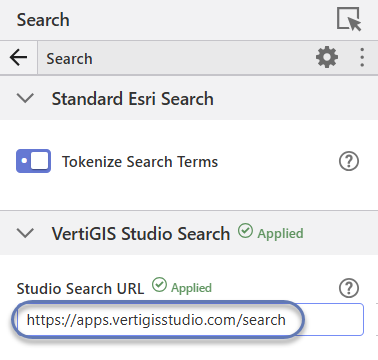
Available URLs:
▪ VertiGIS Studio SaaS offering, region Europe - https://apps.vertigisstudio.eu/search
▪ VertiGIS Studio SaaS offering, region North America - https://apps.vertigisstudio.com/search
▪ URL of on-premises installation - You must know the specific URL for your installation.
▪ no URL - Studio Search is not available.
2.In Components tab > Map > Layer Extensions, expand a layer.
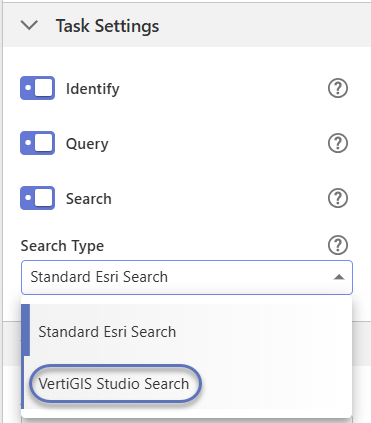
3.In Task Settings, choose VertiGIS Studio Search from the Search Type dropdown. After a few seconds, a Verified message appears.
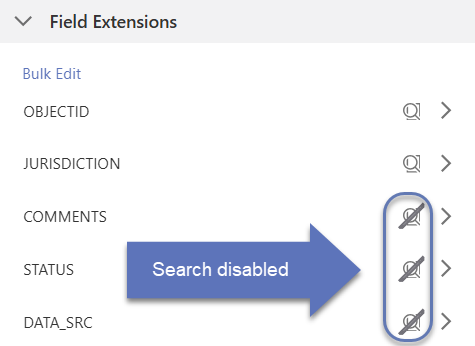
1.Under the Field Extensions section, all fields are enabled by default. To disable a field, click the Search enabled icon.
2.Once a search configuration has been created, detailed settings can be configured in the Studio Search Designer.