Analytics has the ability to track a server's availability (downtime and uptime). The specifics and mechanism of detection works differently between a server, ArcGIS Server, and Portal for ArcGIS.
Server
Analytics determines a server's availability two ways. First the agent on the server detects if the server has been rebooted when the agent starts up and reports this period as unavailable. Second, the Hub detects when an agent disconnects, if this disconnection occurs for longer than ~15 seconds, the Hub reports that the agent is unavailable. These two mechanisms combine to to create a picture of the server's availability.
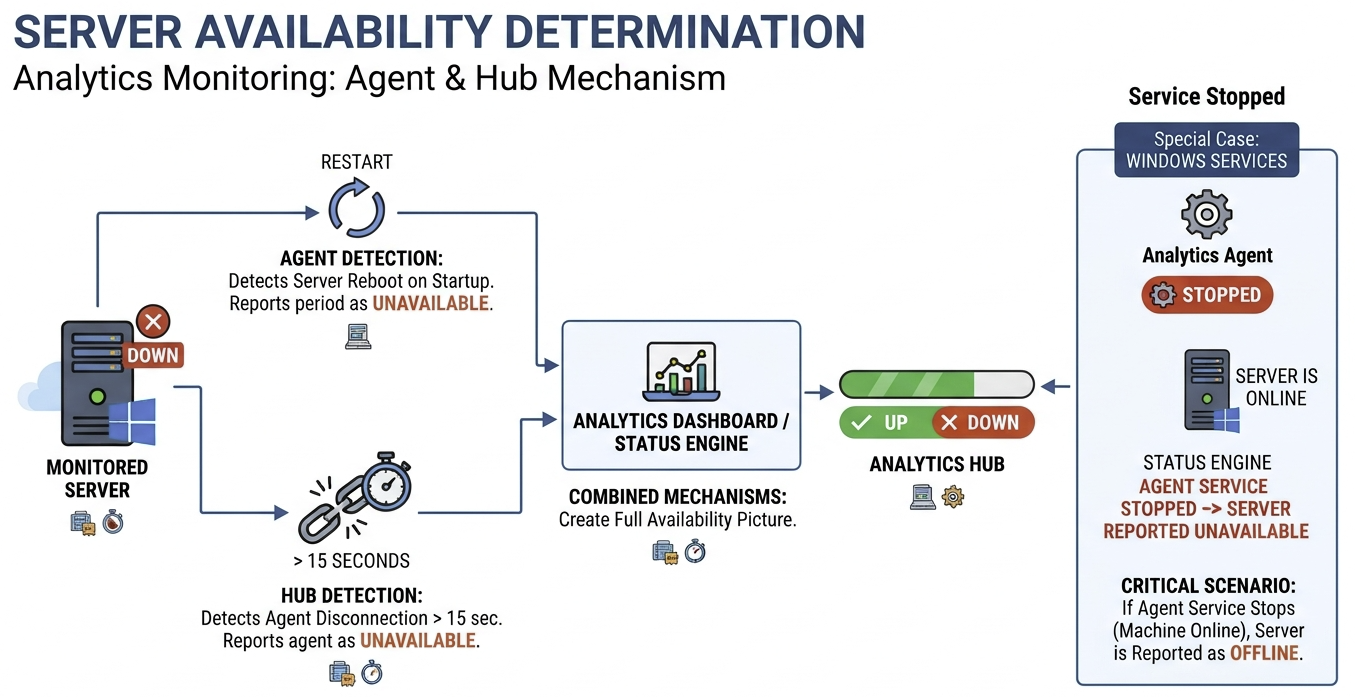
Because this relies of the Hub/agent connection being alive, if the agent's Windows service is stopped, the server will be reported as being offline even if the machine itself is still online.
ArcGIS Server
Analytics combines multiple mechanisms to determine if an ArcGIS Server is available. The agent on the ArcGIS Server will watch the ArcGIS Server heartbeat files that it writes to every minute and if the file is not written to within one minute and ten seconds from the last file change/heartbeat, the agent will report the ArcGIS Server as unavailable. Analytics will also use the same strategy that is used by Server availability detection to determine ArcGIS Server availability. It is not necessary to configure the Server resource for data collection for this to work. These combine to give a complete overview of ArcGIS Server availability.
This detection is per-machine. In a multi-machine deployment of ArcGIS Server, both machines are treated separately and the multiple agents involved in monitoring this type of deployment report on each machines' status.
Portal for ArcGIS
Analytics combines multiple mechanisms to determine if a Portal for ArcGIS is available. The agent on the Portal for ArcGIS server checks the portal's health check endpoint every minute for its status. If this check fails or returns a failed status, the agent reports the portal as unavailable. Analytics will also use the same strategy that is used by Server availability detection to determine Portal for ArcGIS availability. It is not necessary to configure the Server resource for data collection for this to work. These all combine to give a complete overview of Portal for ArcGIS availability.