There are two types of single page prints available: Standard and Infinite.
Standard Print
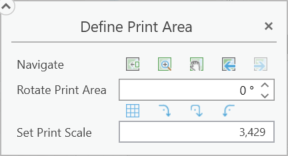
Generates a single-page print based on the defined print area.
Setting |
Description |
|---|---|
Navigate |
•Move print area to current extent - The defined print area is moved to the current map view and centered both horizontally and vertically. •Zoom to print area - Pans and zooms the map so that the defined print area is comfortably centered. •Pan to print area - Pans the map so that the defined print area is comfortably centered. •Previous extent - Toggles backwards through the list of previous map extents. •Next extent - Toggles forward through the list of previous map extents. |
Rotate Print Area |
Change the orientation of the print area. Positive numbers rotate counterclockwise while negative numbers rotate clockwise. Fractions of a degree can be used, but using the up and down arrows increments by a value of 1. •Match area rotation to grid - Rotates the print area to match the grid. •Rotate 90º clockwise - Print area is rotated 90 degrees clockwise. •Rotate 180º - Print area is rotated 180 degrees. •Rotate 90º counter clockwise - Print area is rotated 90 degrees counterclockwise. Any rotation of the print area also rotates the print perspective; however, map labels remain unrotated to maintain readability. |
Set Print Scale |
Sets the level of zoom for the map printout. See scale. |
Infinite Print
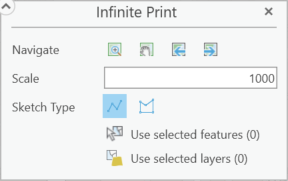
Generates a single-page print based on map selection using geometry.
Setting |
Description |
|---|---|
Navigate |
•Zoom to print area - Pans and zooms the map so that the defined print area is comfortably centered. •Pan to print area - Pans the map so that the defined print area is comfortably centered. •Previous extent - Toggles backwards through the list of previous map extents. •Next extent - Toggles forward through the list of previous map extents. |
Scale |
Sets the level of zoom for the map printout. See scale. |
Sketch Type |
This denotes the method used to determine the print area. For an infinite print, this is determined by either a multi-segmented line •The Drawing tool only shows when performing an Infinite print or a Line print. The print area is defined by the drawn shapes on the map.  •Use selected features: Select features in the map to use this function. •Use selected layers: Select layers in Contents pane to use this function. |