If you plan to run a workflow with a launch link, the workflow must exist before you can add it to the launch link URL. You also need to register the workflow with the specific app in Mobile Designer in Launch Link Workflows component. When you register the workflow, you can give it a specific icon and title that appears in the Mobile app when the workflow runs.
It is important to know whether the workflow you plan to use does, or does not, use a Display Form. If the workflow uses a display form, you must turn on Contains Forms when you register the workflow, or the Mobile app will display an error and will not open.
To register a launch link workflow:
1.Create or open an app in VertiGIS Studio Mobile Designer.
2.In the Services panel, click Launch Link Workflows.
3.In the Launch Link Workflows panel, click +Add Workflows.
The Select Items window opens and by default, lists the workflows that the current user has created - My Content.
To display workflows created and shared by others in your organization, change the filter to Shared With Me.
To search for a specific workflow by name, enter a part of the name, and then click Search.
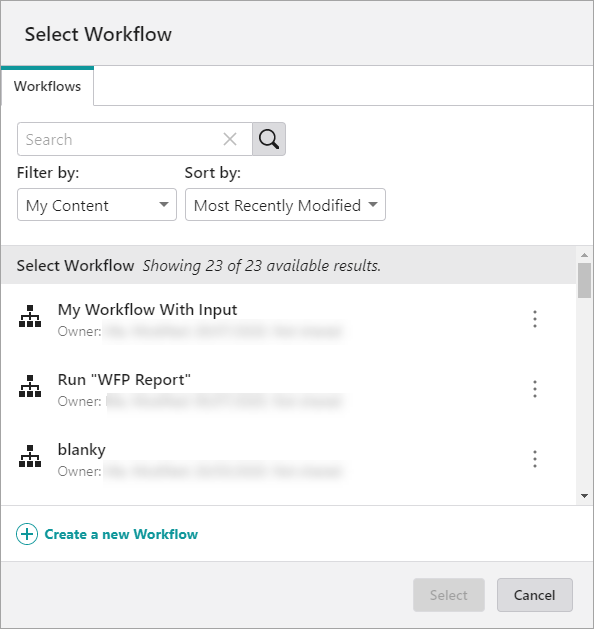
4.Click a workflow in the list, and then click Select.
The workflow is listed in the Launch Link Workflows panel.
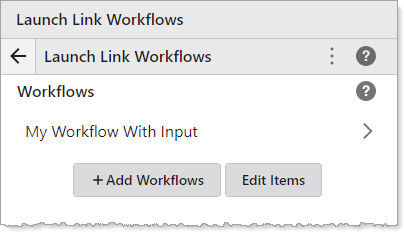
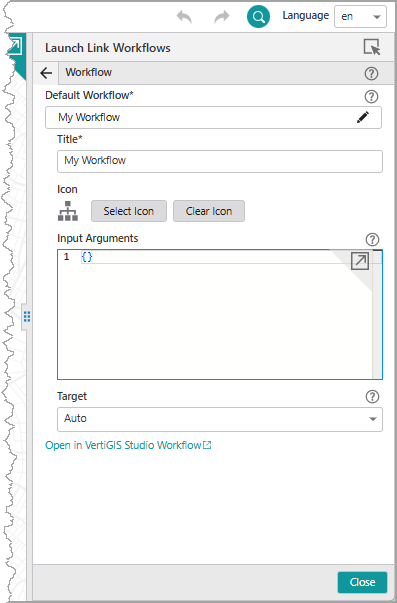
5.Click a workflow to open the Workflow panel, where you can do any of the following:
•Select: open the Select Items window to select a different workflow.
•Title: change the title of the workflow to what you want it to display in the app.
•Icon: change the icon to one that represents this workflow in the app.
•Contains Forms: enable if the workflow contains a Display Form.
If the workflow contains a Display Form and you do not activate this switch, the app will not open when the workflow runs
6.Click File > Save.
The workflow is registered and you can now go to Deploy and create a launch link that includes this workflow.
