You can revert the layout of your app to the last time the app was saved. This is useful when you have made unsaved changes to the layout that you want to discard.
This procedure only affects unsaved changes to the layout, for example, swapping a different layout, or changing a component's layout settings such as the map slot, height, width, alignment and such. It does not revert configuration changes unrelated to the layout of the app.
If you want to discard all changes, see Revert to the Last Saved App.
To revert to the last saved layout:
1.While editing your app in Mobile Designer, select the tab of the layout you want to revert.
2.Click the three-dot menu beside the layout tab.
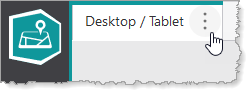
The layout tab menu appears.
3.In the layout tab menu, click Revert to Last Saved Layout.
The layout of the app is reverted to the last time the app was saved.
