Description
The Page Header band displays information at the beginning of every report page, below the top margin band. You may choose to include page information or column headers in this section.
Properties Common to Most Bands
For more information about the properties listed below, see Properties Common to Most Bands.
▪Styles: Style
▪Appearance: Background Color, Border Color, Border Dash Style, Border Width, Borders, Font Name, Font Size, Font Unit, Font Effects, Foreground Color, Padding, Text Alignment
▪Behavior: Keep Together, Page Break, Visible
▪Data: Tag
▪Design: Name
▪Layout: Size
For more information regarding each of the property groups, see the Band Reference.
Actions
Print On |
Specifies where the band should be printed in the print layout in relation to other bands. Options include: ▪All Pages: Prints the band on all pages. ▪Not with Report Header: Prints the band on pages without a report header. ▪Not with Report Footer: Prints the band on pages without a report footer. ▪Not with Report Header and Footer: Prints the band on pages without a report header and footer. |
Print Across Bands |
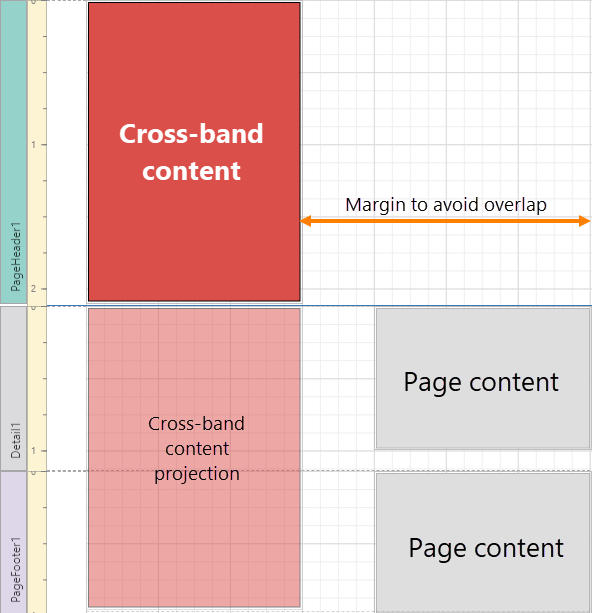
Sets whether this band is printed as the background layer across all other bands that belong to the same page. The cross-band content is cut off at the page's bottom if the page height is exceeded. If the cross-band content does not reach the bottom of the page, the content is not stretched or repeated. If you need to use the Page Header band for cross-band content as well as page header information, add a Sub-Band below the Page Header band to display page header content. You may choose to enable this property if you need to: ▪Arrange the band's content alongside the content of the rest of the page. Provide margins for the page content so as to avoid overlapped elements.
Designer: Print layout content aligned for a cross band Page Header band
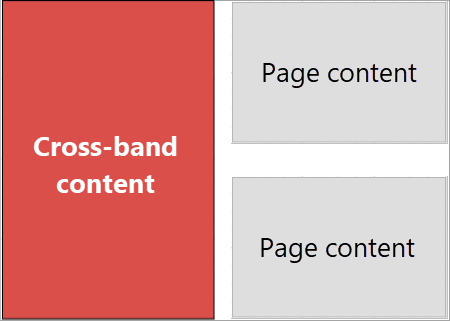
Preview: The Page Header's cross-band content prints next to the page content ▪Create a custom watermark. |
Behavior
Print On |
Specifies where the band should be printed in the print layout in relation to other bands. Options include: ▪All Pages: Prints the band on all pages. ▪Not with Report Header: Prints the band on pages without a report header. ▪Not with Report Footer: Prints the band on pages without a report footer. ▪Not with Report Header and Footer: Prints the band on pages without a report header and footer. |
Print Across Bands |
Sets whether this band is printed as the background layer across all other bands that belong to the same page. The cross-band content is cut off at the page's bottom if the page height is exceeded. If the cross-band content does not reach the bottom of the page, the content is not stretched or repeated. If you need to use the Page Header band for cross-band content as well as page header information, add a Sub-Band below the Page Header band to display page header content. You may choose to enable this property if you need to: ▪Arrange the band's content alongside the content of the rest of the page. Provide margins for the page content so as to avoid overlapped elements.
Designer: Print layout content aligned for a cross band Page Header band
Preview: The Page Header's cross-band content prints next to the page content ▪Create a custom watermark. |
