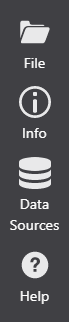
The Sidebar includes a list of options to administer, manage, and learn more about VertiGIS Studio Report Designer.
File
The File button displays a list of options for managing your report item. The options include:
•New: Open a new report.
•My Reports: Displays a list of items you have saved.
•Recent: Displays a list of recently changed items.
•Shared With Me: Displays a list of shared items.
•Save: Saves the current item.
•Save As: Saves the item with a new name.
•Import: Allows you to import a .json file.
•Export: Allows you to export to a .json file.
See also...
Info
The Info button displays the Title and Description of the current item. You can edit both from this panel.
The panel also provides links to:
•The ArcGIS Online or Portal item.
•A button to copy the item URL.
•A hyperlink to open the item URL.
•Information on deployment of the product.
Data Sources
Displays a list of all data sources saved to the user account. You can add, edit, or delete connections.
Changing a data source name will break existing reports that use it.
Help
Displays the product version number and a list of links to various help topics.
