Description
The Set Form Element Property activity assigns a value to an arbitrary property of the specified form element.
Inputs
Element |
Optional The form element to modify, specified as an expression or ID. For example, =$form1.state.dropDownList1 or dropDownList1. Leave Element blank to target the form element that the subworkflow belongs to. |
Property Name |
Required Type: String The name of the element property to modify. |
Property Value |
Optional Type: any The value to assign to the property. |
Markdown |
Optional Type: Boolean Use this to control when values should be considered Markdown. The default is true. |
Outputs
This activity has no outputs.
Properties
For information about the ID, Display Name, and Description properties, see Properties Common to all Activities.
Connectivity Requirements
This activity works when the device has intermittent connectivity to the network.
Example
This example automatically updates the description of a text field when the form opens, using a subworkflow triggered on the form's load event.
Set up the Form
1.Add a Display Form activity and connect it to the Start activity.
2.Open the form editor add a Text element with:
oTitle: Name
oDescription: John Doe
Set up the Subworkflow
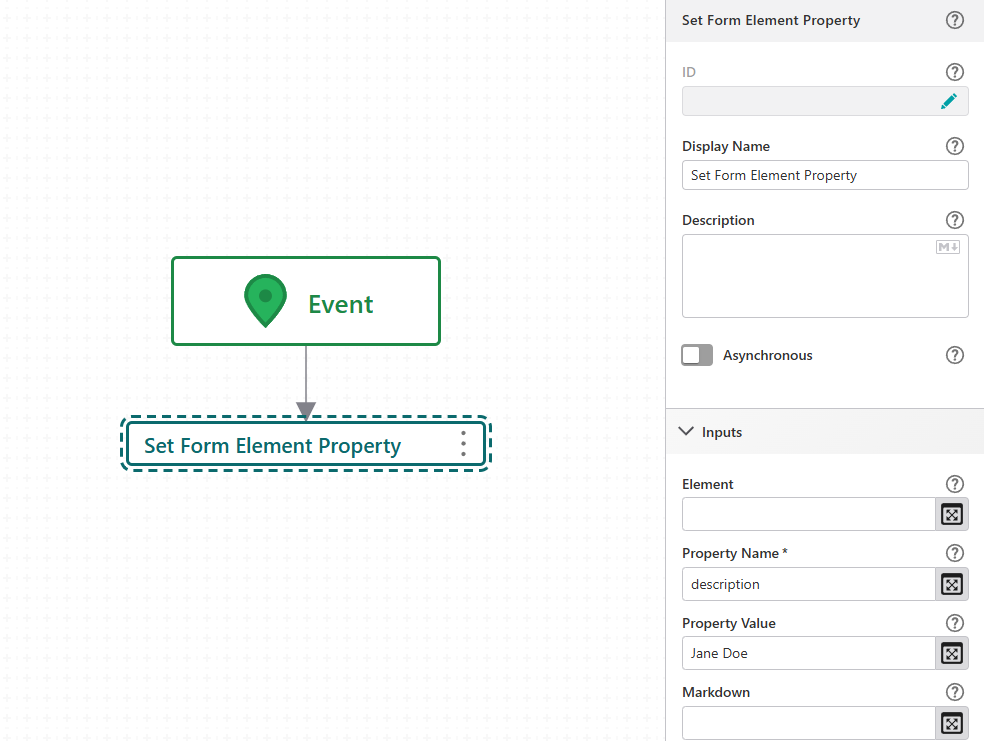
5.In the form editor, select the Text element and open its On Load event to create a subworkflow, which runs automatically when the form loads.
6.Inside the subworkflow, connect a Set Form Element Property activity after Event.
7.Configure the options for the Set Form Element Property activity:
oElement: =$form1.state.text1
oProperty Name: description
oProperty Value: Jane Doe
The Element field value isn’t required here; it’s shown only to demonstrate the syntax, so you may leave it blank. Since the activity runs in a subworkflow attached to text1, it automatically targets that element.
When the workflow runs, the form opens and immediately triggers the subworkflow connected to the Load event. The Set Form Element Property activity targets the Text element's description property, updating its value from John Doe to Jane Doe.