Use the Dimensioning Admin tool to create the feature classes required by the Dimensioning Editor.
You can create a dimension feature class, a construction point feature class, or both. Dimensioning Admin automatically adds the fields required by Studio Desktop.
Only feature classes for which you specify a name are created. For example, to create only a dimension feature class, enter a dimension class name and leave the construction class name empty.
To create a feature class:
1.Open the Dimensioning Admin tool.
2.Select the Geodatabase and the Feature Dataset in which to create the feature classes.
3.Enter a Dimension Class Name.
Leave the field empty if you do not want to create a dimension feature class.
4.Enter a Construction Class Name.
Leave the field empty if you do not want to create a construction point feature class.
5.Specify the Reference Scale for the dimension feature class.
The reference scale is used when calculating text sizes for scale-dependent dimension styles.
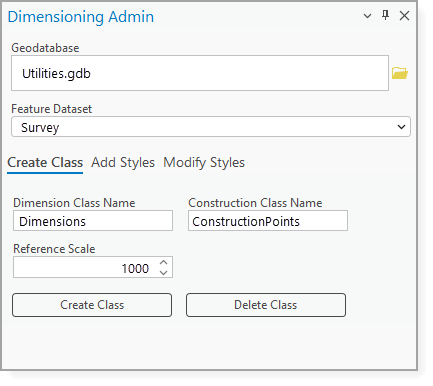
6.Click Create Class.
The specified feature classes are created with the fields required by Studio Desktop.
New feature classes are not automatically added to the current map. Add the feature classes to the map from the Catalog pane before using them with Dimensioning Editor.
7.After you create the feature classes, create a style family for the dimension feature class. See Create a Style Family.