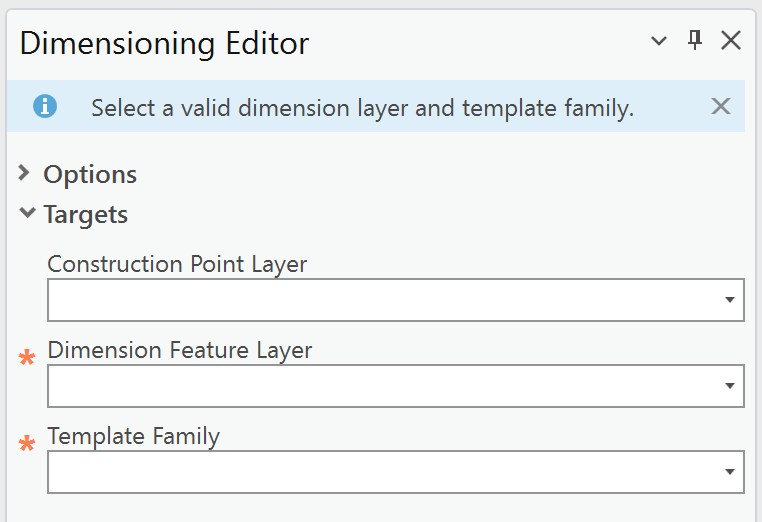
Use the Targets section to define where new dimensioning features are created. Specifically, the dimension and construction layers that will receive the new features.
In this section, you can:
•select the target layers for dimension and construction features.
•choose the template family associated with the selected dimension layer.
All required fields are marked with an asterisk (*).
Your selections determine the available editing and processing options.
You can also select the layers and template in the ArcGIS Pro Create Features panel. Selections in the Create Features panel are automatically synchronized with the Dimension Editor dialogs in Studio Desktop Toolkit, and vice versa. If you update the active template or layer in one interface, the other updates immediately to match.
Setting |
Description |
|---|---|
Construction Point Layer |
A feature layer that stores point features used as auxiliary geometry during editing. Construction points support the creation, positioning, and modification of other features—such as dimensions—but are not part of the final feature geometry. Selecting a Construction Point Layer is optional. If no construction layer is defined, some editing options will be unavailable. |
Dimension Feature Layer* |
The layer that stores dimension features, including their geometry, measurement values, and display properties. Dimension feature layers define how dimensions are created, symbolized, and managed within a map. |
Template Family* |
A logical grouping of feature templates associated with a specific feature layer. Template families organize templates that share common properties and configuration, enabling consistent template selection and feature creation behavior. |
*The string following the first underscore determines the match between the Dimension Feature Layer and the Template Family. Selecting a non-matching template results in an error message and restricted editing options. |
|